HDR Experience in Ubuntu 26.04 (Chrome, NVIDIA RTX 2080)
Quick notes on running HDR10 on Ubuntu 26.04 LTS using KDE Plasma 6 (Wayland) and NVIDIA GeForce RTX 2080.
Hardware & Setup
- OS / Desktop: Ubuntu 26.04 LTS with KDE Plasma 6 (KWin Wayland)
- GPU: NVIDIA GeForce RTX 2080 (Turing) — Driver
nvidia-driver-595-open& Mesa 26.0 - Display / TV: Samsung S95F 65” QD-OLED TV
- On Windows and macOS, I normally use it at
4K 120Hz 4:4:4 10-bit with HDR on - The TV supports up to 165 Hz (I haven’t tested the bit depth and chroma sampling at this mode)
- On Windows and macOS, I normally use it at
Cable Matters Adapter Issue (Windows vs. Linux):
- On Windows, a
Cable Matters USB-C (DP 1.4 Alt Mode) to HDMI 2.1 adapter (Model 201428)drives4K 120Hz 4:4:4 10-bit HDR.- On Linux, this adapter fails to expose HDR (the HDR toggle does not appear in KDE display settings).
- Workaround: Connected directly via native RTX 2080 HDMI 2.0b port to the TV for HDR to be recognized.
Display Configuration
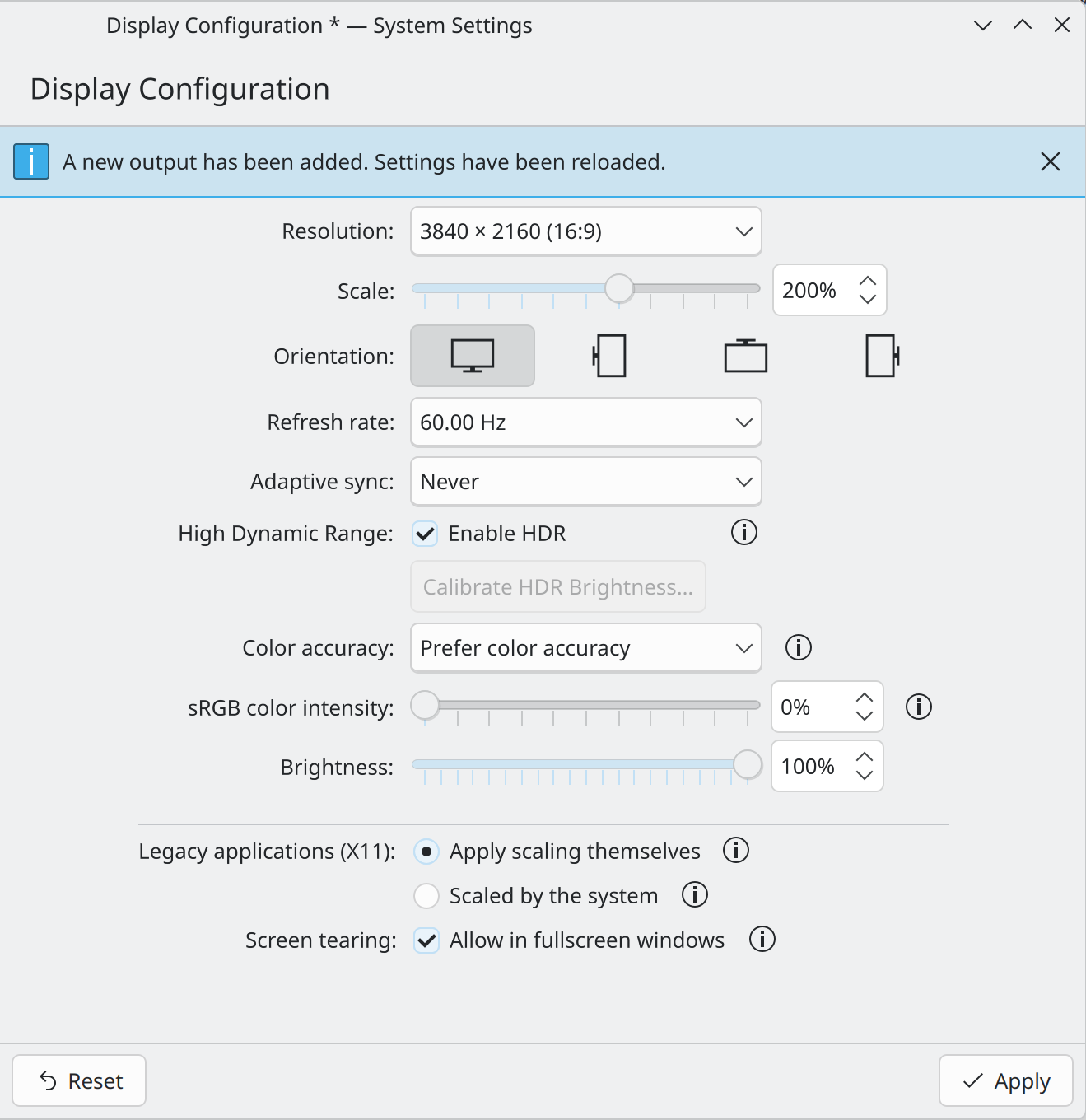 KDE Plasma Display Configuration panel.
- HDMI Bandwidth: 18.0 Gbps (HDMI 2.0b max limit)
- 4K 60Hz 4:4:4 10-bit: Exceeds HDMI 2.0b bandwidth limit (~20.05 Gbps required); requires chroma subsampling (4:2:2/4:2:0) or 8-bit dithered color
Google Chrome HDR Setup & Essential Fixes
Getting HDR playback and wide color gamut rendering working in Google Chrome on Linux requires specific flags, environment variables, and bypassing hidden desktop launcher traps.
1. Persistent Environment Variable
KDE Plasma 6’s Wayland compositor requires ENABLE_HDR_WSI=1 to expose Vulkan / Wayland WSI HDR protocol interfaces to Chromium.
Create ~/.config/environment.d/hdr.conf:
ENABLE_HDR_WSI=1
Also append to ~/.bashrc:
1
export ENABLE_HDR_WSI=1
2. Chrome Command-Line Flags
Configure native Wayland graphics, EGL, and HDR transfer functions in ~/.config/chrome-flags.conf:
1
2
3
4
--ozone-platform=wayland
--use-gl=egl
--force-color-profile=scrgb-linear
--enable-features=UseSkiaRenderer,ColorManagement,HasHDRHeadroom
(Note: In modern Chromium 120+, ColorManagement and HasHDRHeadroom automatically handle HDR transfer functions and color space negotiation with KWin Wayland, so explicit UseHDRTransferFunction args are no longer required.)
3. The Desktop Launcher Trap (.desktop Override)
CRITICAL GOTCHA: Start Menu / Application Launcher Forcing X11
Even with
chrome-flags.confproperly configured, launching Chrome via the Start Menu / Windows key (KDE Application Menu) will still fail to render HDR if desktop shortcuts override the display backend.Local
.desktoplauncher files (e.g.~/.local/share/applications/google-chrome.desktop) often hardcode--ozone-platform=x11into theirExec=lines:
The Fix: Edit
~/.local/share/applications/google-chrome.desktopand replace--ozone-platform=x11with--ozone-platform=waylandacross allExec=lines (Main, New Window, Incognito):
Then refresh KDE’s desktop application cache:
4. Background Master Process Lock-in
Chrome uses a single persistent master process. Simply closing browser windows leaves the master process running in the background. If it was originally launched under X11, opening Chrome again will attach to the existing X11 instance regardless of updated flags.
Always perform a hard restart when updating flags:
1
killall -9 chrome google-chrome google-chrome-stable
Preliminary Impressions & Testing Notes
Chrome YouTube HDR Playback
Tested YouTube HDR streaming using The World in 4K HDR:
Color Banding in Video Playback: Noticeable color banding observed in bright sky gradients.
- Bit Depth Uncertainty: Currently unverified whether the output pipeline is delivering true 10-bit color depth or truncating/dithering to 8-bit.
- Refresh Rate Experiments: Dropping the refresh rate to 30 Hz still exhibits banding.
- Bandwidth Note: 4K @ 30Hz 4:4:4 10-bit theoretically fits within the HDMI 2.0b bandwidth budget (~11.1 Gbps vs. 18 Gbps max), though further hardware signal validation (e.g. monitor OSD/EDID parsing) is needed to confirm 8-bit vs. 10-bit active output.
HDR AVIF Image Playback
Color Banding in HDR AVIF (PQ): Noticeable banding appears in bright sky regions when viewing static PQ-encoded HDR AVIF images (non-gainmap), such as those featured in the Visit to Paris and Strasbourg post.
- Cross-OS Comparison: These exact same photos render smoothly without color banding when viewed in Chrome under Windows and macOS.